
Making screening easy for candidates
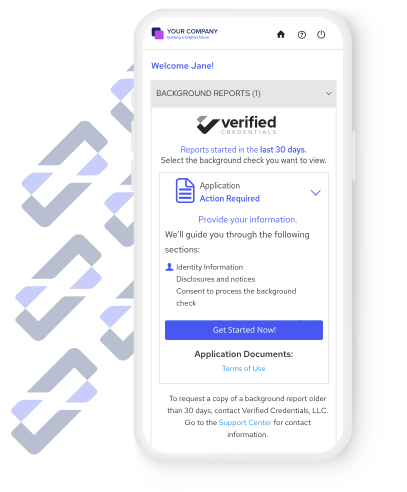
With Verified Credentials' mobile-first candidate experience, you meet candidates where it's most convenient. Learn how easy we make it.
The latest: social media screening

Learn what social media screening is all about. See the conversation between two industry experts.
Featured resource
Learn the latest trends in employment background checks. This report uses real-life usage data to uncover how employers are screening across industries.
Accredited background screening solutions
Our accreditation confirms that our policies, processes, and employee training meet rigorous industry compliance standards.

Report scoring
Verified Credentials' report scoring saves your team time, promotes consistent practices, and reduces risk.
Speed up your background report review process.
Save up to 90% of the time it takes to review background reports. Quickly determine when candidates clear your criteria, freeing you up to focus on the background reports that need further review.
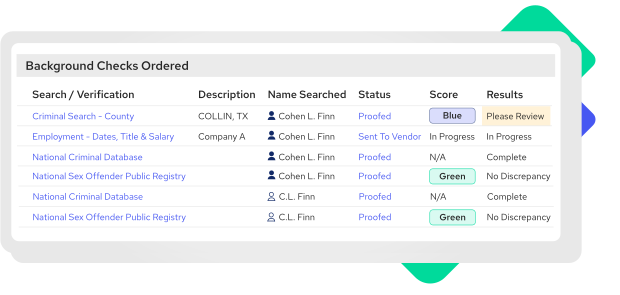
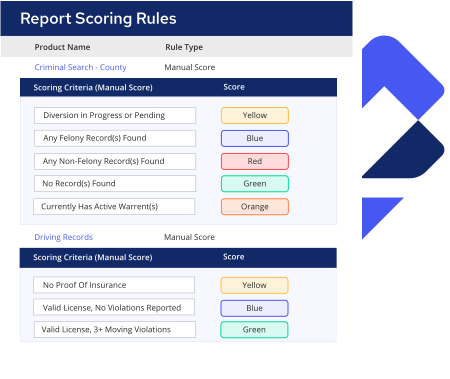
Customize background check results based on your review policy.
Set color-coded rules to flag criminal history, employment verifications, and other factors that matter to you. You can choose the type, level, and age of records to highlight. It’s easy and flexible.
Lower compliance risk.
- Promote consistent use of background information for hiring decisions.
- Demonstrate you have documented steps and rationale for evaluating background check results.
- Maintain consistent practices across multiple business units and locations.


Setup
You provide set criteria based on your policy.

Compare
We compare results with your criteria and assign to one of your established categories.

Review
You review results, knowing right away what areas are of interest or concern.

Company information





© 2024 Verified Credentials, LLC. All rights reserved.